

Introduction
If you have ever worked with cross-platform apps, you may have come across Adobe AIR native extensions and wondered what they actually do. In simple terms, they allow developers to access device-specific features that are not available by default in Adobe AIR. This makes it possible to build more powerful and flexible applications. Whether you are creating a mobile app or enhancing desktop functionality, understanding how these extensions work can take your development skills to the next level.
What Are Adobe AIR Native Extensions?
Adobe AIR native extensions, often called ANEs, are add-ons that enable Adobe AIR applications to interact with native device features using platform-specific code. By default, Adobe AIR provides a wide range of APIs, but it cannot cover every hardware or OS feature. That’s where native extensions come in.
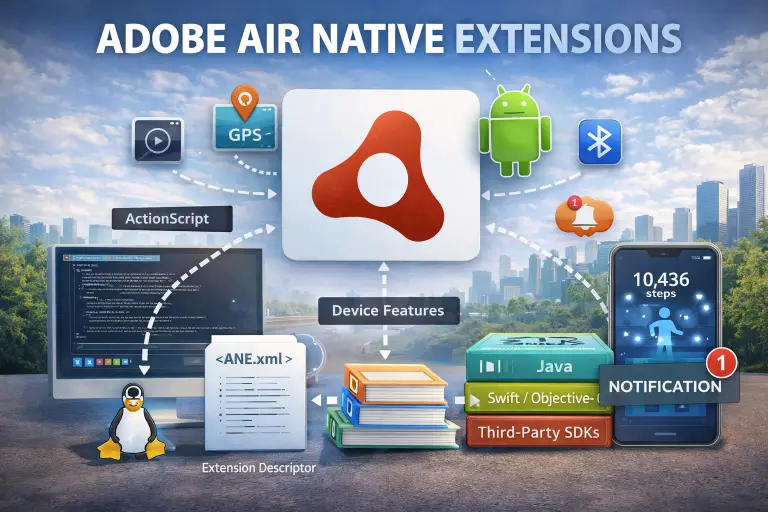
These extensions act as a bridge between ActionScript code and native code written in languages like Java (for Android) or Objective-C/Swift (for iOS). This means developers can access features such as camera controls, sensors, Bluetooth, or custom SDKs that are not included in the core AIR framework.
Why Adobe AIR Native Extensions Are Important
Modern applications often require deep integration with the operating system. Without native extensions, developers would be limited to basic features.
Here’s why they matter:
- They extend the capabilities of Adobe AIR beyond its default limits
- They allow access to device hardware like GPS, camera, and accelerometer
- They enable integration with third-party SDKs such as payment gateways or analytics tools
- They improve performance by using native-level processing
For example, if you are building a mobile game and want advanced vibration feedback or AR features, you will likely need native extensions.
How Adobe AIR Native Extensions Work
To understand how these extensions function, it helps to look at the structure behind them.
ActionScript Layer
This is the main application code written in ActionScript. It communicates with the extension through predefined interfaces.
Native Code Layer
This layer contains platform-specific code. For Android, it is usually written in Java or Kotlin, while for iOS, it uses Objective-C or Swift.
Bridge Mechanism
The ANE acts as a bridge that passes data between ActionScript and native code. When a function is called in ActionScript, it triggers the corresponding native function.
This communication allows developers to combine cross-platform flexibility with native power.
Key Components of an ANE
An Adobe AIR native extension typically includes several important parts:
- Extension descriptor (XML file that defines the extension)
- ActionScript library for communication
- Native libraries for each platform
- Packaging files for distribution
All these components work together to make the extension usable across different devices.
Real-World Example
Let’s say you are building a fitness app using Adobe AIR. You want to track user steps using a device’s motion sensors.
Without native extensions, this feature might not be available. By using an ANE, you can connect your app to the device’s sensor APIs and retrieve real-time step data.
Another common example is integrating push notifications. Many developers use ANEs to connect their AIR apps with Firebase or other notification services.
Benefits of Using Adobe AIR Native Extensions
Using native extensions offers several advantages that improve both development and user experience.
- Access to advanced device features
- Better app performance through native processing
- Flexibility to integrate external SDKs
- Enhanced user experience with richer functionality
These benefits make ANEs a powerful tool for developers who want more control over their applications.
Challenges and Limitations
While Adobe AIR native extensions are useful, they also come with some challenges.
Platform Dependency
Each platform requires its own native code. This means developers must manage multiple codebases for Android and iOS.
Maintenance Effort
As operating systems update, extensions may need to be updated to remain compatible.
Complexity
Building and debugging ANEs can be more complex compared to standard AIR development.
Despite these challenges, many developers find the benefits worth the effort.
Best Practices for Using ANEs
To get the most out of Adobe AIR native extensions, it is important to follow some best practices.
Use Trusted Extensions
Always use well-maintained and reliable ANEs from trusted sources to avoid compatibility issues.
Keep Extensions Updated
Regular updates ensure that your app works smoothly with the latest OS versions.
Optimize Performance
Avoid unnecessary native calls, as excessive communication between layers can impact performance.
Test on Real Devices
Always test your app on actual devices to ensure proper functionality across platforms.
Adobe AIR Native Extensions vs Built-in APIs
Adobe AIR already provides many built-in APIs, so when should you use ANEs?
Built-in APIs are sufficient for standard features like file handling, networking, and basic UI. However, when you need advanced capabilities or access to new hardware features, native extensions become essential.
In short, ANEs complement the existing AIR framework rather than replacing it.
Future of Adobe AIR Native Extensions
Even though Adobe officially discontinued AIR, the platform is now maintained by Harman, which continues to update and support it.
Native extensions remain highly relevant because:
- New mobile features require native integration
- Developers demand more control over hardware access
- Cross-platform development is still widely used
As technology evolves, ANEs will continue to play a key role in extending the capabilities of AIR applications.
Key Takeaways
- Adobe AIR native extensions allow access to device-specific features not available in AIR
- They act as a bridge between ActionScript and native code
- ANEs are essential for advanced app functionality and third-party integrations
- They improve performance but require additional development effort
- Proper maintenance and testing are important for long-term success
FAQ Section
What are Adobe AIR native extensions used for?
They are used to access device features and integrate external SDKs that are not supported by default in Adobe AIR.
Are Adobe AIR native extensions difficult to create?
They can be complex because they require knowledge of both ActionScript and native programming languages.
Can I use the same ANE for Android and iOS?
Yes, but the extension must include separate native code for each platform.
Do native extensions improve app performance?
Yes, they can improve performance by using native-level processing for certain tasks.
Are there free Adobe AIR native extensions available?
Yes, many developers and communities provide free ANEs, though some advanced ones are paid.
Is Adobe AIR still supported?
Yes, it is currently maintained and updated by Harman, ensuring continued usability.
Conclusion
Adobe AIR native extensions open up a world of possibilities for developers who want to go beyond the limitations of the standard AIR framework. By enabling access to native device features, they allow you to build more powerful, responsive, and feature-rich applications. While they require additional effort to implement and maintain, the benefits they offer in terms of flexibility and performance make them an essential tool in modern cross-platform development. If you are serious about building advanced AIR apps, mastering native extensions is a step you should not skip.